REEDR untangles your billing chaos!
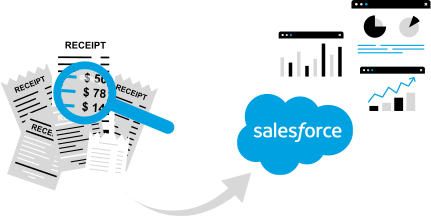
REEDR automatically reads all important information from your incoming invoices—amount, date, supplier, invoice number, and items.
The AI processes the invoice directly in Salesforce and immediately transfers all data to the appropriate objects.
You save time, avoid errors, and speed up the entire invoicing process—without ever leaving Salesforce.


Use Case
Scan your invoices with REEDR...
Manual data entry is a thing of the past. REEDR takes care of it for you—entirely in Salesforce.
Our AI reads all relevant invoice information, checks it, assigns it to the appropriate data records, and transfers everything automatically. In the use case below, you can see step by step how REEDR generates a complete Salesforce entry from a PDF invoice in just a few seconds.
Features
For accurate data in your Salesforce CRM.
With REEDR you can import documents directly into Salesforce. Simply upload the files and the relevant information is extracted from the document and automatically transferred to your Salesforce CRM. This gives you more time to focus on the important tasks.
Fully automated
data transfer
Manual data entry is time consuming. With REEDR, data is automatically recognised and entered into the correct field.
Eliminate
data entry errors
Manual data entry is prone to errors. REEDR transfers data correctly and completely into your system.
Speed up processes for more productivity
Processes often rely on manual steps. With OCR automation, you can speed up processes and increase your team's productivity.


Top tool for document processing and OCR
We are super happy with REEDR and use it for instance for all incoming invoices. Invoices are fetched automatically from emails and then processed and we pay them right from within Salesforce via the millio banking connection. Definitely worth the money.
– Sebastian Paasch | Managing Director | AMX Germany –
FAQs
Why choose REEDR?
Which file formats does REEDR support for invoices?
REEDR recognizes documents in the following formats: PDF, PNG, JPEG, BMP, GIF, TIF. This covers many common invoice formats.
In which languages can REEDR process invoices?
Depending on which AI model or technology partner is used, REEDR can often recognize other European languages in addition to German and English. For specific requirements—e.g., Spanish, French, etc.—it is advisable to contact REEDR directly.
Does the invoice document have to be of a certain quality (e.g., image resolution)?
No — minor imperfections are not a problem, according to REEDR. The underlying AI can extract a lot of invoice data correctly even if the quality is suboptimal.
What information does REEDR extract from invoices?
REEDR can typically read relevant invoice data—such as invoice number, date, amount, customer name, etc. This data is then automatically transferred to your CRM.
How does the upload and processing of invoices work?
You upload the invoice—as a PDF or image—to REEDR (e.g., via the Files area). You can then configure a mapping that specifies which fields in your Salesforce objects the extracted data should be written to. After that, processing can run automatically.
Can I configure REEDR so that only certain invoices are processed?
Yes — using so-called “mapping conditions,” you can specify, for example, that only invoices with certain characteristics (e.g., status “open”) are recognized. This gives you more control over automated processing.
What happens if the document is not an invoice or is a damaged invoice (e.g., incorrect format)?
In this case, the mapping will likely not be applied, or an error message may appear. In such cases, REEDR recommends checking the file or manually reworking it if necessary. Errors appear in the “Results” view.
Who can assist if something does not function properly or an invoice is not processed correctly?
If you encounter any problems, you can contact support at any time—for example, via info@reedr.app or the contact options provided in the product.